
How to Choose a Municipal ERP
Start with this question: what is a municipal ERP?
A municipal ERP (Enterprise Resource Planning) system is a single software platform that manages a local government’s core operations, including fund accounting, budgeting, procurement, utility billing, asset management, in one shared database. Unlike commercial ERP, a municipal ERP must support fund accounting, encumbrances, budgetary control, and Governmental Accounting Standards Board (GASB) reporting.
The distinction matters. A commercial ERP built for revenue and profit reporting can be configured for government, but the selection team should confirm that fund structures, appropriation controls, and annual comprehensive financial report (ACFR) preparation work natively rather than through custom code.
Why ERP selection deserves a formal process
ERP selection is a long-term commitment. Most agencies keep a core financial system for a decade or more, and the selection decision shapes staff workload, audit results, and public transparency for that entire period. The Government Finance Officers Association (GFOA), whose Research and Consulting Center has assisted hundreds of local governments with ERP projects, notes that “ERP projects are also difficult and many organizations struggle with the challenges of new technology, organization change, and project governance”. [1]
Cross-industry research points the same way. In Panorama Consulting Group’s 2026 ERP Report (170 respondents surveyed January 2025 to January 2026), more than a quarter of organizations reported their project ran over budget and almost a quarter reported it ran over schedule. The most common cause of budget overruns was an “unexpected need for additional technology,” which the report ties to poor system selection and unmet reporting requirements. [2] In other words, many implementation problems begin during selection.
Signs it’s time to replace a legacy system
A local government is usually ready to evaluate a new ERP when several of the following are true:
- Staff maintain critical data in spreadsheets outside the system of record.
- Finance, utility billing, and permitting run on separate systems that do not share data.
- Month-end close preparation depends on manual reconcilliation.
- The vendor has announced end of support, or upgrades require a consultant and downtime.
- Only one or two employees know how to run key reports.
- Residents cannot pay bills, apply for permits, or view financial data online.
- Auditors have issued findings tied to system limitations or segregation-of-duties gaps.
How to choose a municipal ERP in 7 steps
The following process reflects common public-sector practice for ERP readiness and system selection. Each step includes the output the selection team should have before moving on.
Step 1: Confirm readiness and governance
Before issuing a Request for Proposal (RFP), leadership should name an executive sponsor, a project manager, and a steering committee with representatives from finance, IT, HR, utilities, and community development. Governance comes first because organizational issues, not software, are the leading cause of schedule overruns. [2]
Step 2: Document current processes and pain points
The selection team should map how work happens today: how a purchase order is approved, how a utility bill is generated, how a permit moves from application to inspection. Each map should note workarounds, duplicate data entry, and manual reports. This inventory becomes the basis for requirements and for measuring improvements after go-live.
Step 3: Write outcome-based requirements
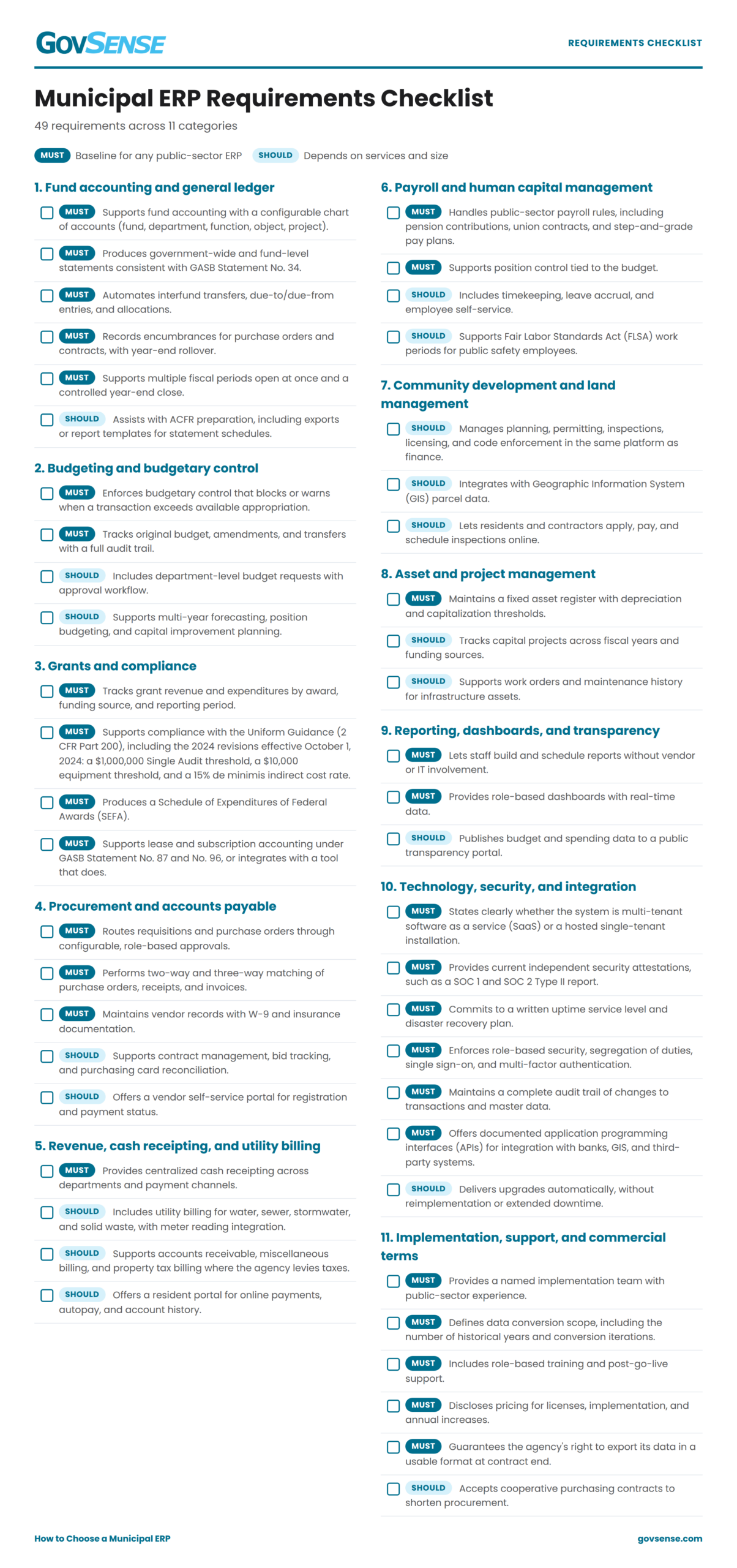
Strong requirements describe the result the agency needs, not the screen it is used to. “The system will block a requisition that exceeds the available appropriation balance” is testable. “The system will have a budget check button” is not. Each requirement should be labeled as Must Have or Nice to Have so vendors and evaluators can separate essentials from preferences. The checklist below is a starting point.
Step 4: Require scripted demonstrations
A scripted demonstration asks every finalist to walk through the same real-world scenarios using the agency’s own sample data: posting a budget amendment, processing a grant reimbursement, running a utility bill cycle, or closing a fiscal year. Scripted demos prevent vendors from showing only their strongest features and let evaluators score each finalist on the same scale.
Step 5: Check references at peer agencies
References are most useful when they come from agencies of similar size, structure, and service mix. A water district should speak with other water districts; a city of 20,000 residents should speak with cities of similar population. Ask each reference what went wrong, how the vendor responded, and whether they would choose the same system again.
Step 6: Compare total cost of ownership
License price is only one part of cost. Total cost of ownership (TOC) over five to ten years should include subscription or license fees, implementation services, training, upgrades, third-party add-ons, and internal staff time. Cloud subscriptions also carry reporting implications: under GASB Statement No. 96, effective for fiscal years beginning after June 15, 2022, most subscription-based information technology arrangements must be recognized as an intangible asset and liability. [3] Finance staff should review contract terms with GASB 96 in mind.
Step 7: Negotiate scope, service levels, and exit terms
The contract and Statement of Work (SOW) should state exactly what the vendor will configure, how many data conversion iterations are included, what training is provided, and what happens when scope changes. It should also define uptime commitments, support response times, and how the agency retrieves its data, in a usable format, if the relationship ends.
Cloud ERP vs. Hosted ERP: what’s the difference?
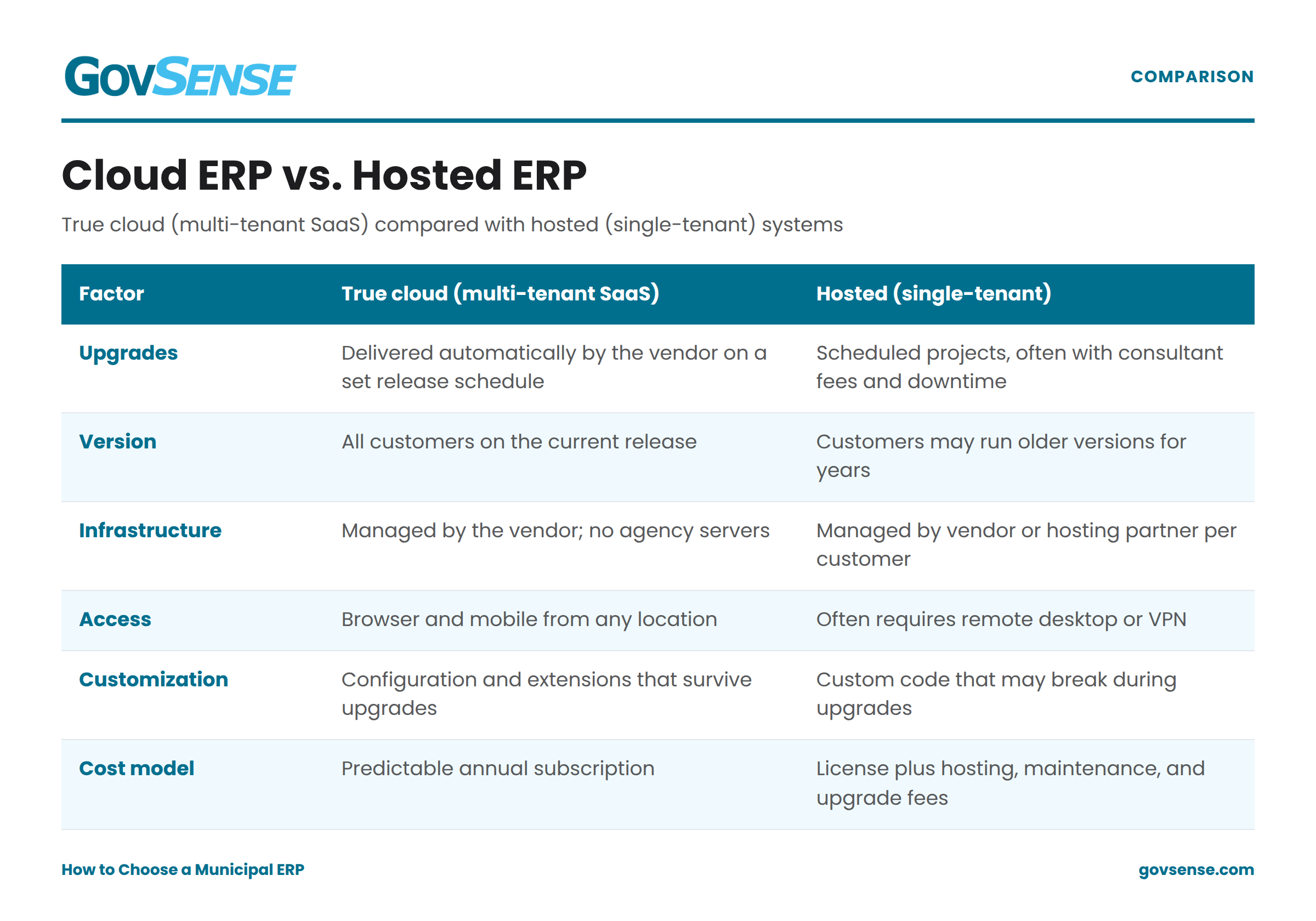
Many vendors describe their products as “cloud,” but the term covers two different models. A true cloud (multi-tenant SaaS) ERP runs one current version for all customers and delivers updates automatically. A hosted ERP is traditional software installed on a server or a third party manages. The table below summarizes the differences.
Questions to ask ERP vendors during demonstrations
- How many local governments at our size and type are live on the current version of your product?
- Walk through a federal grant from award setup to SEFA reporting.
- How are upgrades delivered, and what downtime should be expected?
- Which of your features require third-party product or additional licenses?
- How do we export all of our data if we leave?
Common mistakes in municipal ERP selection
- Copying the old system’s requirements. Requirements written around legacy screens reproduce legacy workarounds.
- Skipping scripted demos. Unscripted demos make every product look capable.
- Underestimating staff time. Implementation requires finance, IT, and department staff to test, validate data, and attend training while doing their regular jobs.
- Comparing license price instead of five-year cost. Add-ons, upgrades, and hosting fees often change the ranking.
- Treating ERP as an IT project. The system changes how every department works; ownership belongs with operational leaders.
How GovSense approaches municipal ERP
GovSense is a true cloud Government Resource Planning (GRP) platform built on Oracle NetSuite for cities, counties, and special districts. It brings financial management (accounting, budgeting, fund management, utility billing, asset management) and land management (permitting, planning, inspections, licensing, code enforcement) into one system with shared data. Schedule a Demo to walk through a scripted scenario with sample data.
FAQ
How long does it take to choose a municipal ERP?
A formal ERP selection typically takes four to nine months from readiness assessment to contract signature. The timeline depends on the agency’s procurement rules, the number of departments involved, whether a consultant is used, and how many finalists advance to scripted demonstrations.
What is the difference between ERP and GRP?
Government Resource Planning (GRP) is ERP designed for public-sector organizations. A GRP system adds government-specific capabilities such as fund accounting and grant compliance to the core ERP functions of finance, procurement, and HR.
Should a small city or special district use the same ERP as a large county?
Not necessarily. Smaller agencies usually need the same compliance features as large ones but have fewer staff to run the system. They should favor platforms that require little IT support, deliver upgrades automatically, and can be implemented with a limited internal team.
What should an ERP RFP include?
An ERP RFP should include a project overview, a line-by requirements matrix, demo scripts, required pricing forms covering at least five years, implementation and training expectations, security and hosting questions, reference requirements, and evaluation criteria with weights.
Does GASB 96 apply to cloud ERP subscriptions?
In most cases, yes. GASB Statement No. 96 applies to subscription-based information technology arrangements to give a government the right to use vendor software for a period of time, which describes most cloud ERP contracts. Short-term arrangements of 12 months or less are a possible exception. Agencies should confirm treatment with their auditor.
Which ERP modules should a local government implement first?
Most agencies start with core financials (general ledger, budgeting, procurement, and accounts payable) because every other module depends on them. Payroll, utility billing, and community development modules typically follow in later phases once the financial foundation is stable.
Municipal ERP requirements checklist
The checklist below covers the requirements most local governments, special districts, and authorities include in an ERP evaluation. Items marked MUST are generally baseline expectations for a public-sector ERP; items marked SHOULD depend on the agency’s services and size.
Sources:
1. Government Finance Officers Association, “ERP Readiness and System Selection.”
gfoa.org/erp-readiness-and-system-selection
2. Panorama Consulting Group, The 2026 ERP Report (170 respondents, January 2025 to
January 2026). panorama-consulting.com
3. Government Finance Officers Association, “GASB 87 and 96 Resource Center.”
gfoa.org/gasb-resource-center
4. U.S. Environmental Protection Agency, “What’s New: 2024 Revision to 2 CFR Part 200.”
epa.gov/grants
GovSense is the first complete cloud solution purpose-built for local governments, empowering over 60 communities and supporting more than 2 million citizens. Govsense built on Oracle NetSuite—the #1 true cloud ERP platform with over 50,000 customers worldwide— GovSense delivers a modern, unified system that streamlines operations, enhances transparency, and drives efficiency. GovSense’s team has been implementing cloud solutions since 2005, bringing over two decades of expertise in delivering scalable and secure technology for local agencies. As a five-time GovTech 100 recipient, we are recognized as an industry leader in transforming government technology. GovSense is one modern platform that has everything you need for your local government, ensuring your community is equipped with the tools to thrive in the digital age.